2. Building Simple Models
This section will show you how to build simple models in CSDL. We will start by creating a Recorder object, and then create some variables and perform operations on them. Finally, we will stop the recorder and access the values of our variables. The full script is shown below, after which we will break down each part of the script.
import csdl_alpha as csdl
import numpy as np

# Start recorder
recorder = csdl.Recorder(inline=True)
recorder.start()

# make variables
x = csdl.Variable(value=0)
y = csdl.Variable(value=0, name='y')

# define model
f = (x - 3)**2 + x*y + (y + 4)**2 - 3

# finish up
recorder.stop()
print(f.value)
recorder.active_graph.visualize()
$ python3 ex_simple.py
[22]
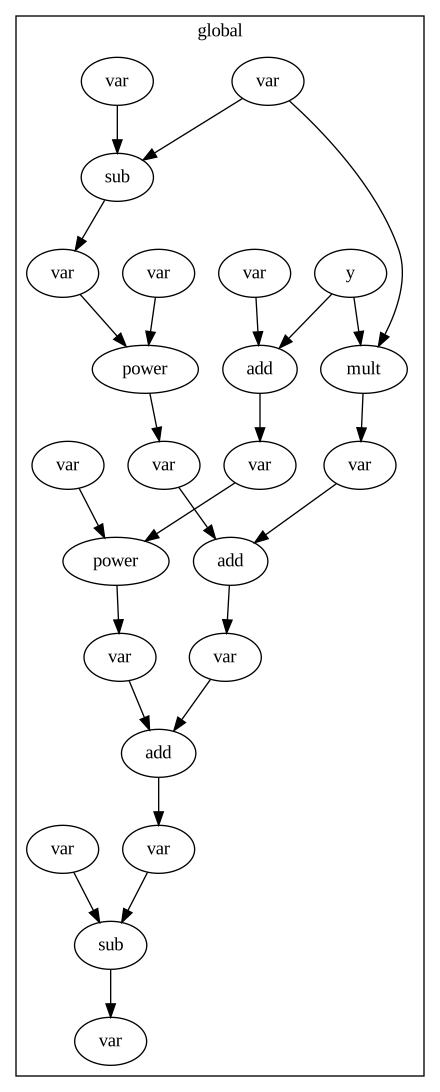
2.1. Starting the recorder
The first step in creating a CSDL model is to create a Recorder object. The Recorder class will compile your CSDL code into a Graph object, and can also execute the graph to get the output values of your variables. Without a Recorder object, your CSDL code will not do anything. You can also pass in arguments to the recorder, such as inline=True to execute the graph inline.
import csdl_alpha as csdl
import numpy as np

recorder = csdl.Recorder(inline=True)
recorder.start()
2.2. Making variables
Variables in CSDL are represented by the Variable class. Variables can be scalars, vectors, matrices, or tensors, and can have any number of dimensions. Variables you create represent inputs to the model with fixed or changing values. You can create a variable by passing in a shape tuple to the Variable constructor. You can also optionally pass in a value, which is needed for inline evaluation. You can also give names to variables, which are used when saving data or accessing variables after compilation.
x = csdl.Variable(value=0)
y = csdl.Variable(value=0, name='y')
2.3. Defining your model
Once you have created your variables, you can define your model by performing operations on them. CSDL operations look similar to numpy operations, but they are actually creating nodes in the graph. You can perform operations on variables by using the standard python operators, or by calling functions from the csdl module. You can also define custom operations if needed. Operations take Variables as inputs, but can also take numpy arrays, floats, and ints, which will be converted to Variables.
f = (x - 3)**2 + x*y + (y + 4)**2 - 3
2.4. Finishing up
After you have defined your model, you can stop the recorder. You can then access the values of your variables by calling the value attribute of the variable, if inline is activated. You can also visualize the graph of your model through the recorder.
recorder.stop()
print(w.value)
recorder.active_graph.visualize()