1. More Debugging
CSDL provides a few tools to help you debug your code. This section will cover some of the most common debugging techniques in CSDL.
Tools |
Description |
|---|---|
|
Computes values right as operations are defined |
|
Debug mode stores a trace of the file and line # of where the variable was created. |
|
Saves an image of the graph itself (can be slow for large models). |
|
Displays the adjency matrix of the graph itself (can be slow for large models). |
|
Saves the variables’ values to a csv file. |
|
Displays the graph hierarchy of the recorder (useful to visualize nested for loops, nonlinear solvers and composed operations). |
|
Lists how many variables created per file/function |
|
Lists how many operation instances per type of operation |
|
Lists the largest variables in terms of number of elements |
We will go through a few examples to show how some of these examples work
1.1. Inline evaluation
With inline = True, print the values of your variables as soon as they are computed. If a value is not given when instantiating a variable, the inline evaluation will throw an error, so make sure to set a value when you can.
import csdl_alpha as csdl
recorder = csdl.Recorder(inline=True)
recorder.start()

a = csdl.Variable(name='a', value=10.0)
b = csdl.Variable(name='b', value=5.0)
c = a+b**2.0

recorder.stop()

# The value of c is a numpy array populated with the value of the expression
print('inline = True:')
print('  value:       ', c.value)
print('  value type:  ', type(c.value))
print('  value shape: ', c.value.shape)
print()
inline = True:
  value:        [35.]
  value type:   <class 'numpy.ndarray'>
  value shape:  (1,)
With inline = False, the graph is built but the actual computations are not evaluated as the graph is built. We can see that a variable’s value is empty if inline evaluation is turned off.
import csdl_alpha as csdl
recorder = csdl.Recorder()
recorder.start()

a = csdl.Variable(name='a', value=5.0)
b = csdl.Variable(name='b', value=15.0)
c = a+b**2.0

recorder.stop()

# The value of c is None because the expression was not evaluated
print('inline = False:')
print('  value:       ', c.value)
print('  value type:  ', type(c.value))
# print('  value shape: ', c.value.shape)
print()
inline = False:
  value:        None
  value type:   <class 'NoneType'>
To actually run the code, use recorder.execute()
recorder.execute()

# The value of c is updated with the value of the expression
print('inline = False, after recorder.execute():')
print('  value:       ', c.value)
print('  value type:  ', type(c.value))
print('  value shape: ', c.shape)
print()
inline = False, after recorder.execute():
  value:        [230.]
  value type:   <class 'numpy.ndarray'>
  value shape:  (1,)
a.set_value(10.0)
b.set_value(10.0)
recorder.execute()

# The value of c is updated with the value of the expression
print('inline = False, after recorder.execute():')
print('  value:       ', c.value)
print('  value type:  ', type(c.value))
print('  value shape: ', c.shape)
print()
inline = False, after recorder.execute():
  value:        [110.]
  value type:   <class 'numpy.ndarray'>
  value shape:  (1,)
1.2. Debugging mode
With csdl.Recorder(debug = True), the construction of every variable is tracked. Call a variable’s print_trace method to show where in your code that variable was created.
import csdl_alpha as csdl
recorder = csdl.Recorder(debug = True)
recorder.start()

a = csdl.Variable(name='a', value=5.0)
b = csdl.Variable(name='b', value=15.0)
c = a+b**2.0

# uncomment when running
# c.print_trace()

recorder.stop()
1.3. Graph Visualization
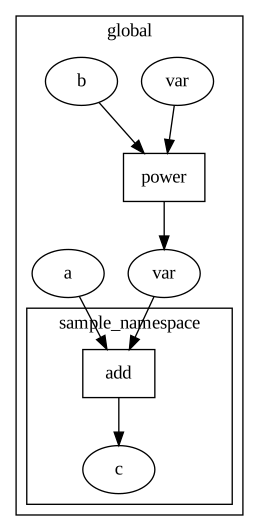
In order to visualize the graph itself, use Recorder.visualize_graph().
import csdl_alpha as csdl
recorder = csdl.Recorder(inline = True)
recorder.start()

a = csdl.Variable(name='a', value=5.0)
b = csdl.Variable(name='b', value=15.0)
b2 = b**2.0
with csdl.namespace('sample_namespace'):
    c = a+b2
    c.add_name('c')

recorder.visualize_graph('very_small_graph') # saves to current working directory

recorder.stop()
The saved image:
To see an example of Recorder.print_graph_structure(), see the nonlinear_solver.ipynb example.
1.4. Save to CSV
To view all variables, use csdl.inline_export(summary_csv=True)
import csdl_alpha as csdl
recorder = csdl.Recorder(inline = True)
recorder.start()

a = csdl.Variable(name='a', value=5.0)
b = csdl.Variable(name='b', value=15.0)
b2 = b**2.0
with csdl.namespace('sample_namespace'):
    c = a+b2
    c.add_name('c')

csdl.save_all_variables()
csdl.inline_export('output_csv_file', summary_csv=True, do_print=True)
recorder.stop()
Variable                 Min                             Max                            Mean                           Shape      Graphs
a                        5.0                             5.0                            5.0                            (1,)       graph
b                        15.0                            15.0                           15.0                           (1,)       graph
variable_0               2.0                             2.0                            2.0                            (1,)       graph
variable_1               225.0                           225.0                          225.0                          (1,)       graph
sample_namespace.c       230.0                           230.0                          230.0                          (1,)       graph